
Free AI YouTube Summarizer
Summarize Any YouTube Video Without Watching It
Paste a YouTube link and PageSum turns the video into a summary with chapters you can jump to. Skip the 40-minute video and keep the 2 minutes that matter.
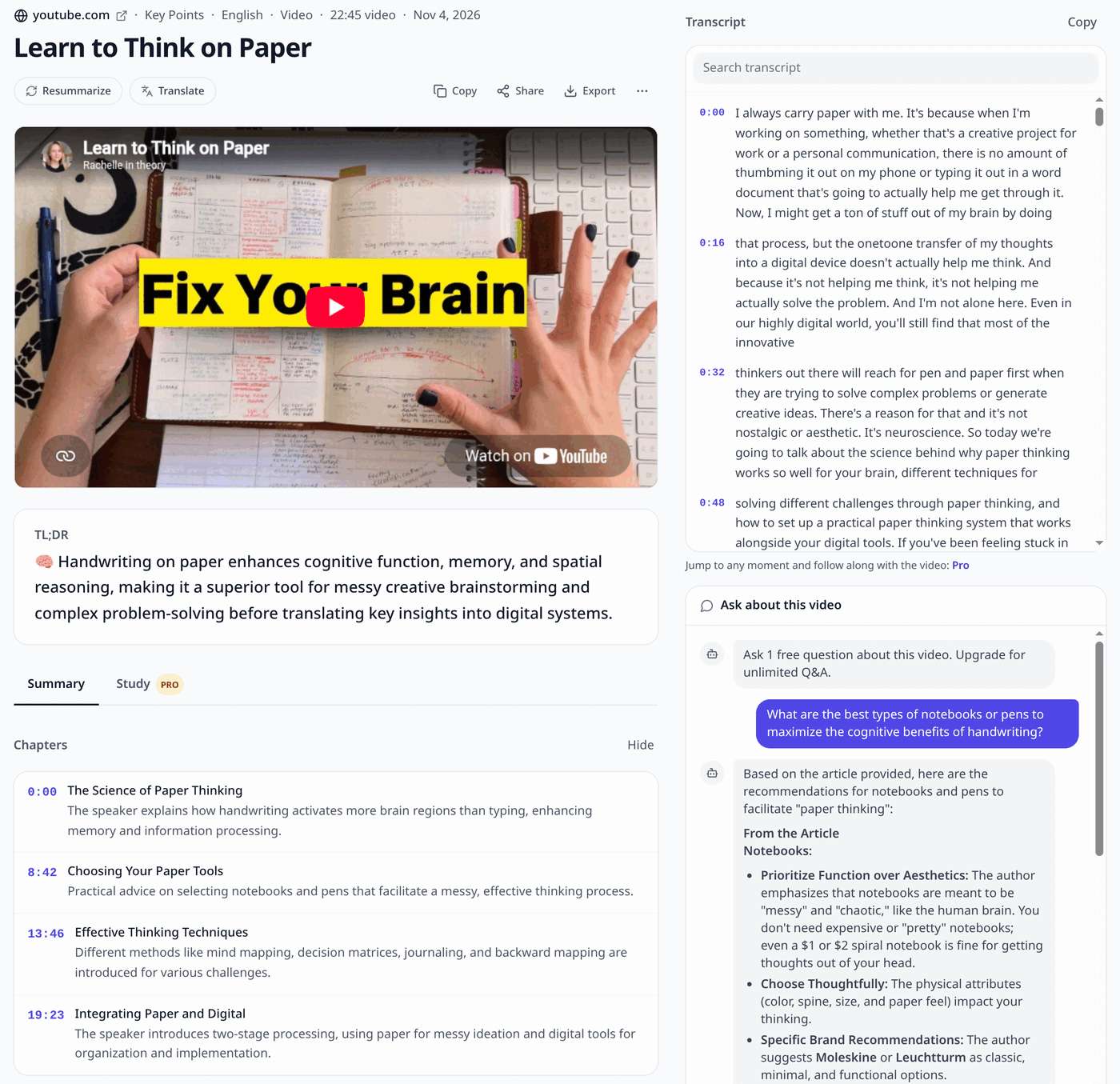
A real result
How It Works
How to summarize a YouTube video
Copy the YouTube link
Copy the URL from the address bar or the Share button. Regular videos, Shorts and youtu.be links all work.
Paste it into PageSum
Paste the link and pick a summary mode: Quick for a short overview, Key Points for a scannable list.
Read the summary
PageSum reads the video's transcript and writes the summary, with chapters that link to the right moment in the video.
What You Get
More than a wall of text
Chapters
Videos of 3 minutes or more are split into chapters with start times, so you can jump to the part you care about.
Long videos
On Pro, lectures, podcasts and interviews with captions work at any length (the summary covers roughly the first hour). The free plan covers the first 5 minutes of any video.
Videos without captions
No captions? PageSum transcribes the audio with AI: up to 5 minutes free, up to 25 minutes on Pro.
6 summary modes
Quick and Key Points on the free plan. Detailed, ELI5, ELI10 and One-Liner on Pro.
Any language
Summaries in 36 languages. Get an English summary of a Spanish video, or keep the original language.
Ask the video
Ask follow-up questions and get answers from what was actually said. 1 question a day free, unlimited on Pro.
Timestamped answers
PROSummary points cite the moment they come from as [m:ss]. Click one and the video jumps there.
Flashcards from videos
PROTurn a lecture into flashcards and quizzes, then review them with spaced repetition.
PageSum vs other YouTube summarizers
Checked on each tool's own site on November 4, 2026. Limits and prices change, so check their pages before you decide.
Account needed
- PageSum
- Yes, free (email link)
- NoteGPT
- Its summarizer page says "No Login"
- Eightify
- Not stated on its home page
Free limit
- PageSum
- 1 video a day (2 on your first day)
- NoteGPT
- Called free; no daily limit stated
- Eightify
- Not stated on its home page
Videos without captions
- PageSum
- AI transcription: 5 min free, 25 min on Pro, 90 min on Max
- NoteGPT
- Up to 150 min on its summarizer page; 120 to 210 min on paid plans on its pricing page
- Eightify
- Not stated on its home page
Summary
- PageSum
- Yes: 6 modes (2 on the free plan), 36 languages, follow-up questions
- NoteGPT
- Yes: key points, up to 20 videos at once on its top plan
- Eightify
- Yes: key ideas with timestamps, 40+ languages
Transcript download
- PageSum
- TXT, SRT, VTT, free
- NoteGPT
- TXT; says "multiple formats" without naming others
- Eightify
- Not stated on its home page
Paid plan
- PageSum
- $7.99/month or $59/year
- NoteGPT
- From $9.99/month or $108/year
- Eightify
- Not stated on its home page
Also works for
- PageSum
- TikTok, Instagram Reels, Facebook, X
- NoteGPT
- Vimeo, Udemy, Coursera
- Eightify
- Not stated on its home page
| PageSum | NoteGPT | Eightify | |
|---|---|---|---|
| Account needed | Yes, free (email link) | Its summarizer page says "No Login" | Not stated on its home page |
| Free limit | 1 video a day (2 on your first day) | Called free; no daily limit stated | Not stated on its home page |
| Videos without captions | AI transcription: 5 min free, 25 min on Pro, 90 min on Max | Up to 150 min on its summarizer page; 120 to 210 min on paid plans on its pricing page | Not stated on its home page |
| Summary | Yes: 6 modes (2 on the free plan), 36 languages, follow-up questions | Yes: key points, up to 20 videos at once on its top plan | Yes: key ideas with timestamps, 40+ languages |
| Transcript download | TXT, SRT, VTT, free | TXT; says "multiple formats" without naming others | Not stated on its home page |
| Paid plan | $7.99/month or $59/year | From $9.99/month or $108/year | Not stated on its home page |
| Also works for | TikTok, Instagram Reels, Facebook, X | Vimeo, Udemy, Coursera | Not stated on its home page |
Got a long video with no captions and don't want to pay? NoteGPT's page says it handles up to 150 minutes with no login, and PageSum's free plan stops at 5. PageSum is the better fit when your videos also come from TikTok, Reels or Facebook.
Free and Pro limits
| Free | Pro | |
|---|---|---|
| Video summaries | 1 per day (2 on your first day) | Unlimited |
| Videos with captions | First 5 min | Any length |
| Videos without captions | Up to 5 min (AI transcription) | Up to 25 min (AI transcription) |
| Summary modes | Quick, Key Points | All 6 |
| Chapters (videos 3 min+) | Yes | Yes |
| Full transcript with timestamps, search, copy, .txt/.srt/.vtt | Yes | Yes |
| Click-to-jump transcript, [m:ss] citations in summaries | — | Yes |
| Follow-up questions | 1 per day | Unlimited |
Pro is $7.99/month or $59 for a year. See everything in Pro
Frequently asked questions
Is this YouTube summarizer free?
Yes. The free plan includes 3 summaries a day, 1 of which can be a video, in Quick or Key Points mode. No credit card is needed. Pro removes the daily limits and adds all 6 modes.
How does PageSum summarize a YouTube video?
PageSum fetches the video's captions (uploaded by the creator or auto-generated by YouTube) and summarizes the transcript with AI. If a video has no captions, it transcribes the audio first.
Can it summarize long YouTube videos?
Yes, on Pro. The free plan covers the first 5 minutes of any video. On Pro, videos with captions work at any length, including multi-hour podcasts: the summary is based on roughly the first hour of the transcript, and chapters cover the same span. Videos without captions go up to 25 minutes on Pro and 90 on Max.
What if the video has no captions?
PageSum transcribes it with AI. That works for videos up to 5 minutes on the free plan and up to 25 minutes on Pro. Longer ones, up to 30 minutes, are summarized from their start.
Does it work with YouTube Shorts?
Yes. Paste a Shorts link like any other YouTube link. Most Shorts are under 3 minutes, so they work on the free plan even without captions.
Can I summarize YouTube videos in other languages?
Yes. By default the summary uses the video's language. You can also pick one of 36 output languages, for example to get an English summary of a German video.
Which videos don't work?
Private and members-only videos, live streams, and playlists. Paste a single public video instead.
Is there a YouTube summarizer Chrome extension?
Yes. The PageSum Chrome extension opens a side panel next to the video and summarizes it in one click, without leaving YouTube.
Related guides
- Podcast summarizer: episodes and interviews
- How to summarize a YouTube video without watching it
- How to summarize long YouTube videos and podcasts
- Summarize multiple YouTube videos at once
- Summarize a YouTube video that has no captions
- 5 best video summarizer tools compared
- Turn a YouTube transcript into a summary
- TikTok and Instagram Reels summarizer
Got a video you don't have time to watch?
Free to start, no credit card. 1 video summary a day on the free plan.
Summarize a YouTube Video Free