
Free AI Facebook Video Summarizer
Summarize Facebook Videos Reels and Lives, From the Link
Paste a Facebook video, Reel or Live replay and PageSum turns what was said into a summary you can skim, plus a transcript you can copy or download.
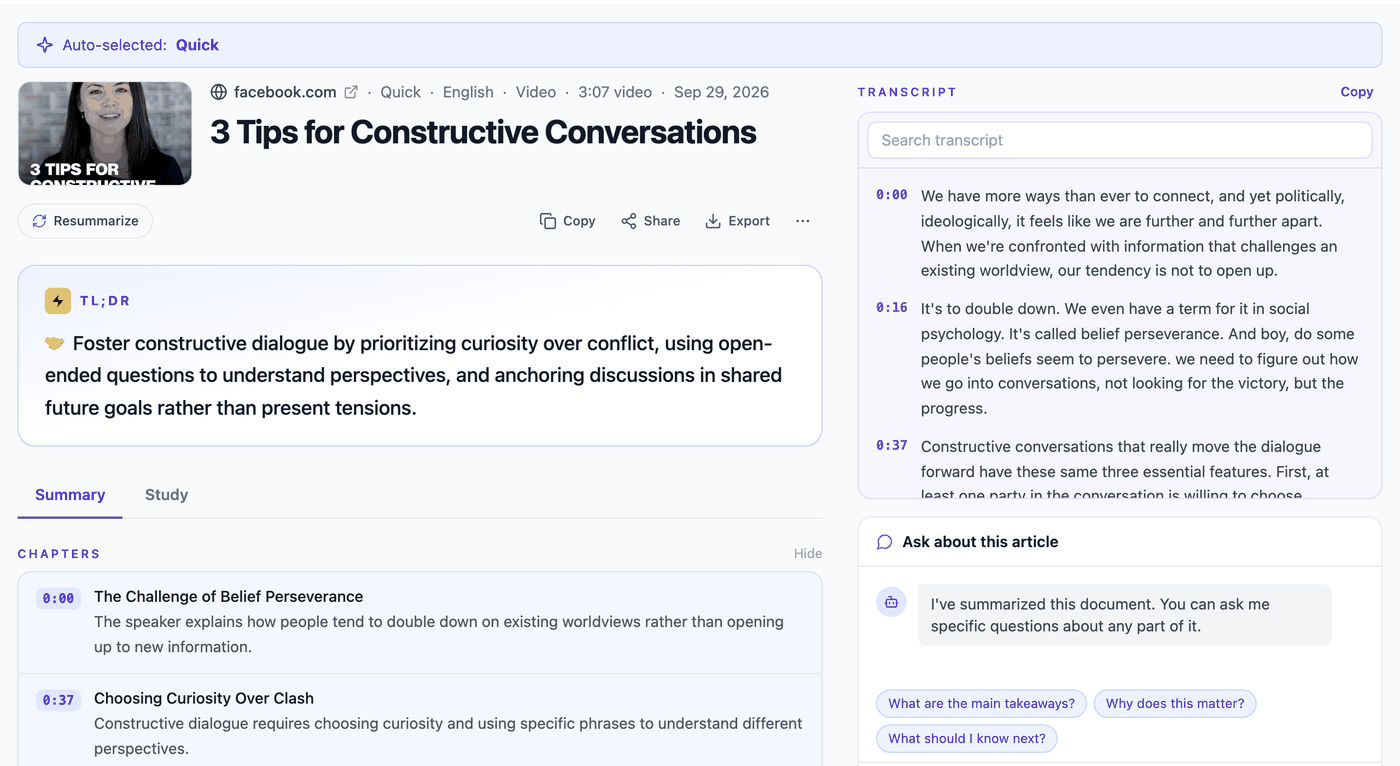
A real result
How It Works
How to summarize a Facebook video
Copy the video link
On Facebook, tap Share, then Copy link. Reel, Watch, Live replay and fb.watch links all work.
Paste it into PageSum
Paste the link and pick Quick for a short overview or Key Points for a list you can act on.
Read the summary
PageSum uses the video's captions, or transcribes the audio with AI when there are none, and writes the summary.
What You Get
Built for Facebook videos
No captions needed
Most Facebook Reels have no captions. PageSum transcribes the audio with AI, so you still get a summary.
Transcript included
Copy the transcript, or download it as TXT, SRT or VTT. Free on every plan.
Full Lives on Max
A Live replay, sermon or webinar without captions is transcribed up to 90 minutes on Max, enough for most full Lives. Free covers the first 5 minutes, Pro the first 25.
Any language
Summaries in 36 languages. Get an English summary of a Thai, Spanish or Hindi video.
Ask about the video
Ask which product was mentioned or what the steps were. 1 question a day free, unlimited on Pro.
Saved and searchable
Every summary lands in your history, so the Reel you saw last week is one search away.
All 6 summary modes
PRODetailed, ELI5, ELI10 and One-Liner on top of Quick and Key Points.
Unlimited videos
PROThe free plan includes 1 video a day. Pro has no daily limit.
Steps from how-to videos
When a video teaches a procedure (a recipe, a garden remedy, a repair), you also get numbered steps and a list of the materials, with the amounts the creator says.
PageSum vs other Facebook video tools
Checked on each tool's own website on 24 October 2026. Limits and prices change, so check their pages before you decide.
Share links from the app (facebook.com/share/…)
- PageSum
- Yes, Reel and video share links
- fbtotranscript.com
- Video share links (/share/v/) listed
- ScreenApp
- Not listed (watch, videos and fb.watch links are)
Account needed
- PageSum
- Yes, free (email link)
- fbtotranscript.com
- No
- ScreenApp
- Yes, free
Free limit
- PageSum
- 1 video a day (2 on your first day)
- fbtotranscript.com
- No daily number stated (rate-limited)
- ScreenApp
- 2 transcriptions, up to 45 min each
Videos without captions
- PageSum
- AI transcription: 5 min free, 25 min on Pro, 90 min on Max
- fbtotranscript.com
- AI transcription, up to 30 min
- ScreenApp
- Not stated on its page
Summary
- PageSum
- Yes: 6 modes (2 on the free plan), 36 languages, follow-up questions
- fbtotranscript.com
- Key takeaways
- ScreenApp
- Yes, with AI chat
Transcript download
- PageSum
- TXT, SRT, VTT, free
- fbtotranscript.com
- TXT, SRT, VTT
- ScreenApp
- File downloads need a paid plan
Paid plan
- PageSum
- $7.99/month or $59/year
- fbtotranscript.com
- None listed (free)
- ScreenApp
- $19/month billed yearly, $30 monthly
| PageSum | fbtotranscript.com | ScreenApp | |
|---|---|---|---|
| Share links from the app (facebook.com/share/…) | Yes, Reel and video share links | Video share links (/share/v/) listed | Not listed (watch, videos and fb.watch links are) |
| Account needed | Yes, free (email link) | No | Yes, free |
| Free limit | 1 video a day (2 on your first day) | No daily number stated (rate-limited) | 2 transcriptions, up to 45 min each |
| Videos without captions | AI transcription: 5 min free, 25 min on Pro, 90 min on Max | AI transcription, up to 30 min | Not stated on its page |
| Summary | Yes: 6 modes (2 on the free plan), 36 languages, follow-up questions | Key takeaways | Yes, with AI chat |
| Transcript download | TXT, SRT, VTT, free | TXT, SRT, VTT | File downloads need a paid plan |
| Paid plan | $7.99/month or $59/year | None listed (free) | $19/month billed yearly, $30 monthly |
Only need the transcript of a long public video, with no account? fbtotranscript.com is free and goes up to 30 minutes. PageSum is built for the summary, questions about the video and a history of everything you watched.
Free and Pro limits
| Free | Pro | |
|---|---|---|
| Video summaries | 1 per day (2 on your first day) | Unlimited |
| Videos with captions | First 5 min | Any length |
| Videos without captions | Up to 5 min (AI transcription) | Up to 25 min (AI transcription) |
| Summary modes | Quick, Key Points | All 6 |
| Chapters (videos 3 min+) | Yes | Yes |
| Full transcript with timestamps, search, copy, .txt/.srt/.vtt | Yes | Yes |
| Click-to-jump transcript, [m:ss] citations in summaries | — | Yes |
| Follow-up questions | 1 per day | Unlimited |
Pro is $7.99/month or $59 for a year. See everything in Pro
Frequently asked questions
Can AI summarize a Facebook video?
Yes. Paste a Facebook video link into PageSum and it summarizes what is said in the video. If the video has captions, PageSum uses them; if not, it transcribes the audio with AI first.
Is the Facebook video summarizer free?
Yes. The free plan includes 1 video summary a day, in Quick or Key Points mode. No credit card is needed.
Does it work with Facebook Reels?
Yes. Public Reels work, including share links like facebook.com/share/r/…. Most Reels have no captions, so PageSum transcribes the audio.
Can I summarize a Facebook Live?
Yes, once the Live has ended and the replay is public. The free plan covers the first 5 minutes of any video. With captions, Pro covers any length. Without captions, Pro covers up to 25 minutes and Max up to 90, enough for most full Lives, sermons and webinars.
Can I get the transcript of a Facebook video?
Yes. Every video summary comes with its transcript. Copy it with one click, or download it as TXT, SRT or VTT subtitles.
Which Facebook videos don't work?
Links to videos in private groups or friends-only posts, because PageSum opens links as a logged-out visitor and never signs in to your account, and videos with only background music. If you have the video file, upload it instead (MP4, MOV or WebM, up to 50 MB) and PageSum transcribes and summarizes it the same way.
Can it turn a Facebook recipe or how-to video into written steps?
Yes. When a video walks through a procedure, such as a recipe, a homemade fertilizer or a repair, PageSum adds a Steps card above the summary: the materials or ingredients first, then numbered steps with the amounts and times that are spoken. Advice, news and motivation videos get no steps, only the summary.
Related guides
- Facebook video to text: just the transcript
- Sermon notes from a Facebook Live or YouTube service
- Turn a DIY or gardening video into a step-by-step checklist
- How to summarize a Facebook video or Reel
- How to get a Facebook Reel transcript, even with no captions
- TikTok and Instagram Reels summarizer
- YouTube video summarizer
Turn Facebook videos into notes
Free to start, no credit card. 1 video summary a day on the free plan.
Summarize a Facebook Video Free