
How to Get a Facebook Reel Transcript (Even With No Captions)
TL;DR: Facebook has no "Show transcript" button for Reels, and most Reels have no captions. To get the text, paste the Reel's link into PageSum: it transcribes the audio with AI, summarizes it, and lets you copy the transcript or download it as TXT, SRT or VTT. Free with a PageSum account, 1 video a day.
You watched a Reel with a recipe, a quote or a tip you want to keep, and there's no way to copy what was said. Facebook shows auto-generated captions on some videos, but you can't select or export them, and many Reels have none at all.
Why Facebook Reels Have No Transcript
Facebook only generates captions for some videos, only shows them while the video plays, and never offers them as text. YouTube has a "Show transcript" panel; Facebook has nothing like it. So getting a Facebook video to text means one of two things:
- Reading existing captions from the video file, when the uploader or Facebook added them. Fast and exact, but most Reels don't have any.
- Transcribing the audio with a speech-to-text model. Works on any video with speech, captions or not.
PageSum tries the first and falls back to the second automatically.
How to Get the Transcript of a Facebook Reel
- Copy the link. On the Reel, tap Share, then Copy link. Links like
facebook.com/share/r/…,facebook.com/reel/…andfb.watch/…all work. - Paste it into PageSum. Go to pagesum.app/dashboard and paste the link.
- Wait a few seconds. If there are no captions, PageSum downloads just the audio and transcribes it.
- Copy or download. The transcript appears next to the summary. Click Copy for plain text, or open the export menu to download TXT, SRT or VTT.
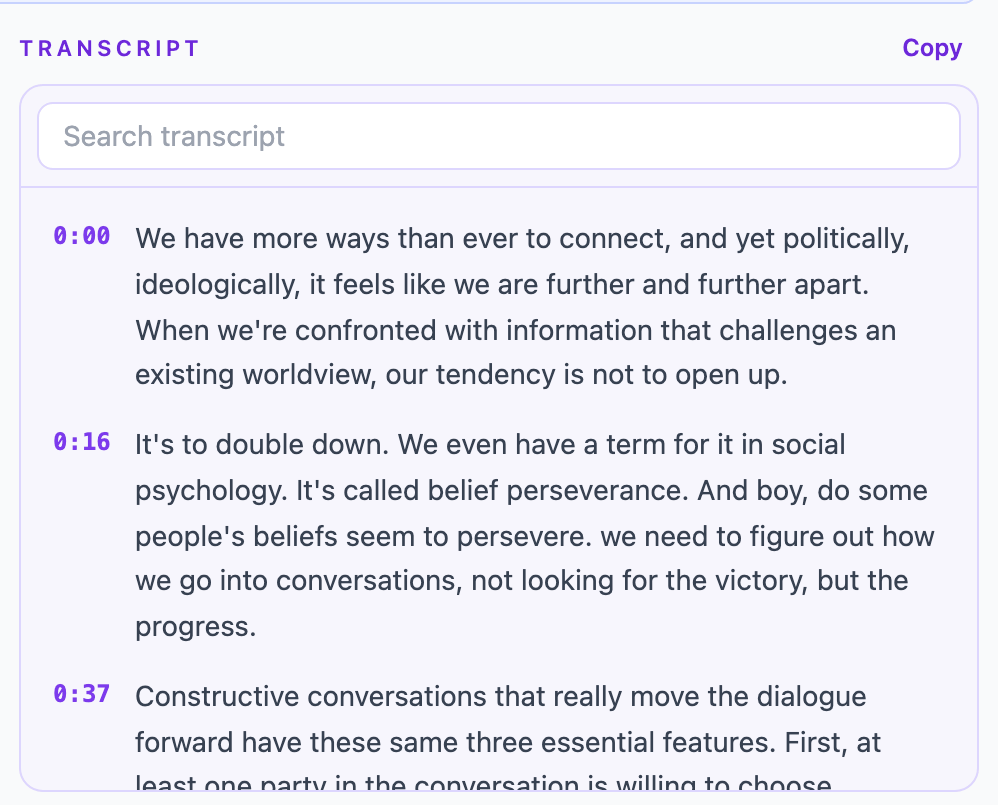
Pro view. On the free plan the transcript is the same text, without the timestamps.
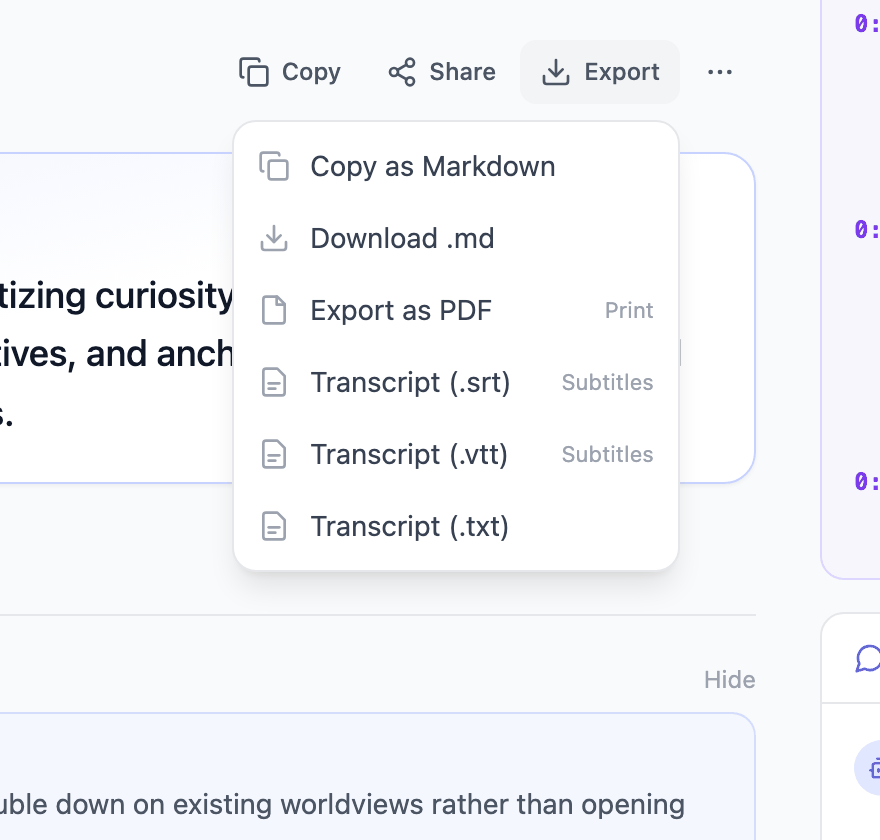
The same steps work for regular Facebook videos and Live replays.
Which Format to Download
- Copy (plain text): paste into notes, an email or a document. No timestamps.
- TXT: readable text with a
[m:ss]time label every ~15 seconds, handy for finding a moment in the video. - SRT or VTT: subtitle files with exact timings. Use them to add captions when you re-upload your own video, or open them in a video editor.
Limits
| Free | Pro | Max | |
|---|---|---|---|
| Videos per day | 1 | Unlimited | Unlimited |
| Reels and videos with captions | Any length | Any length | Any length |
| Transcribed without captions | First 5 minutes | First 25 minutes | First 90 minutes |
| Copy, TXT, SRT, VTT | Yes | Yes | Yes |
| Searchable transcript synced to the video | No | Yes | Yes |
Most Reels are under 3 minutes, so the free plan transcribes them in full. For a long Live replay without captions, you get the transcript of its opening minutes.
The video must be public: Reels from private groups and friends-only posts can't be fetched. Transcription works in most languages, and you can have the summary written in a different one.
Other Facebook Transcript Tools
If you only need raw text for many videos, a dedicated transcript tool may suit you better. What we saw on their pages in September 2026 (check each site, these change often):
| Tool | Free without an account | Exports | Summary |
|---|---|---|---|
| PageSum | No (free account, 1 video a day) | Copy, TXT, SRT, VTT | Yes, 6 modes, plus Q&A |
| Supadata | Yes, heavy use rate-limited | TXT, SRT | No |
| WayinVideo | Yes | TXT, SRT, VTT, DOC | Yes |
| BibiGPT | Free preview | Summary and transcript | Yes, plus mind map |
| TranscriptMagic | First run | SRT | Yes |
PageSum's difference is what comes after the transcript: a summary you can skim, follow-up questions about the video, and a searchable history of everything you've saved, across Facebook, TikTok, Instagram, YouTube, articles and PDFs.
Frequently Asked Questions
How do I get a transcript of a Facebook video? Copy the video's link, paste it into PageSum, and copy the transcript or download it as TXT, SRT or VTT. Facebook itself doesn't offer transcripts.
Can I transcribe a Facebook Reel without captions? Yes. PageSum transcribes the audio with AI when a Reel has no captions: the first 5 minutes on the free plan, the first 25 minutes on Pro and up to 90 minutes on Max.
Is it free? Yes, with a free PageSum account: 1 video a day, including the transcript and its downloads. Pro is unlimited.
Can I get the transcript of a Facebook Live? Yes, once the Live has ended and the replay is public. Without captions, PageSum transcribes its first 5 minutes (free), 25 minutes (Pro) or up to 90 minutes (Max), enough for most full Lives.
Can I transcribe videos from private groups? No. PageSum can only fetch public videos.
How accurate is it? Clear speech with little background music transcribes well. Heavy music, several people talking at once, or strong accents lower the accuracy.
Get a Facebook video transcript free · Related: How to Summarize a Facebook Video or Reel · Summarize TikTok and Instagram Videos
Try it on your video
Paste a TikTok, Instagram Reel, Facebook, X or YouTube link and get the transcript and a summary in seconds. Free, no credit card.
More posts
How to Summarize a Facebook Video or Reel with AI
Paste a Facebook video, Reel or Live replay link into PageSum and get an AI summary and transcript in seconds, even when the video has no captions. Which links work, free vs Pro limits, and tips.
PageSum vs NoteGPT vs Eightify: Which YouTube Summarizer to Use
An honest comparison of PageSum, NoteGPT and Eightify for summarizing YouTube videos: platforms, videos without captions, pricing and who each tool is best for. Checked September 2026.
How to Summarize Long YouTube Videos and Podcasts
How to get a useful summary of a 1-hour lecture, podcast or livestream replay on YouTube: which mode to use, how chapters help, and what to know about very long transcripts.
How to Summarize a YouTube Video With No Captions
Most summarizers fail when a YouTube video has no subtitles. Here's how PageSum transcribes caption-less videos with AI, what the length limits are, and what to do when a video is too long.
5 Best Video Summarizer Tools in 2026 (Free & Paid)
Comparing the best AI video summarizer tools in 2026: PageSum, Summarize.tech, NoteGPT, Notta, and Kagi. Honest breakdown of features, limits, and which one is actually worth using.
How to Summarize TikTok and Instagram Videos with AI
Paste a TikTok, Instagram, X or Facebook video link into PageSum and get an AI summary. Explains when it works, what limits apply on the free and Pro plans, and why some videos can't be summarized.