
كيف تلخّص فيديو أو ريل من فيسبوك بالذكاء الاصطناعي
باختصار: لتلخيص فيديو من فيسبوك، انسخ رابطه («مشاركة» ← «نسخ الرابط»)، والصقه في PageSum، واختر «Arabic» كلغة للملخص. يعمل مع الفيديوهات العامة والريلز وإعادات البث المباشر، سواء كانت لها ترجمة أم لا: إذا لم تكن لها ترجمة، يحوّل PageSum الصوت إلى نص بالذكاء الاصطناعي. الخطة المجانية تتضمن فيديو واحدًا يوميًا (3 في اليوم الأول)، وPro بلا حدود. وتحصل أيضًا على نص الفيديو كاملًا لتنسخه أو تنزّله.
على فيسبوك محتوى كثير مفيد بالفيديو: دروس دينية ومحاضرات، ونصائح عن المال والعمل، وأخبار، ومقاطع عن الذكاء الاصطناعي والتقنية، وبث مباشر يستمر ساعة. معظمها بلا ترجمة مكتوبة ولا فصول، فالطريقة الوحيدة لمعرفة محتواها هي مشاهدتها كاملة. الملخص يتيح لك قراءة الفكرة أولًا، ثم مشاهدة الفيديو فقط إذا كان يستحق.
كيف تلخّص فيديو من فيسبوك
- انسخ الرابط. على الفيديو أو الريل، اضغط مشاركة ثم نسخ الرابط. على الكمبيوتر يمكنك أيضًا نسخ العنوان من شريط المتصفح.
- الصقه في PageSum. اذهب إلى pagesum.app/dashboard والصق الرابط في حقل الرابط.
- اختر اللغة والنمط. من قائمة اللغة اختر Arabic ليأتي الملخص بالعربية. ثم اختر «سريع» (Quick) لنظرة عامة قصيرة، أو «النقاط الرئيسية» (Key Points) لقائمة. يضيف Pro أربعة أنماط أخرى.
- اقرأ الملخص. في الريل يستغرق ذلك بضع ثوانٍ عادة، وأكثر قليلًا إذا كان يجب تحويل الصوت إلى نص.
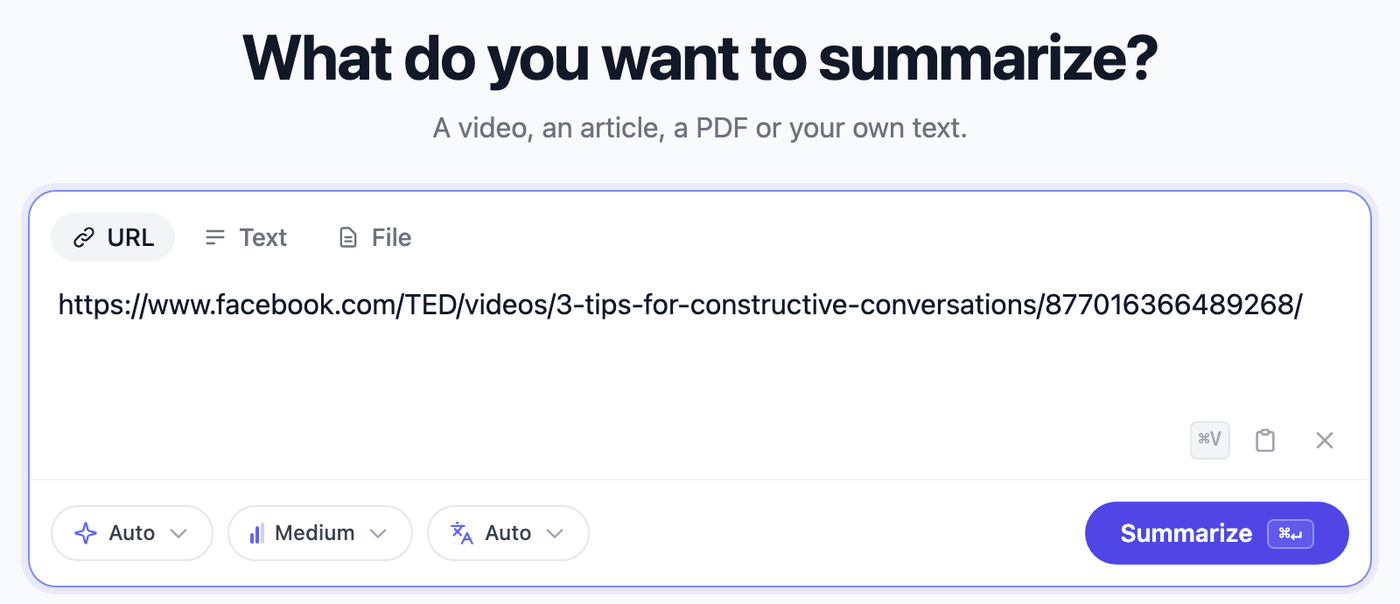
يفتح الملخص ومعه نص الفيديو بجانبه، فتستطيع التحقق من أي نقطة مقارنةً بما قيل فعلًا.
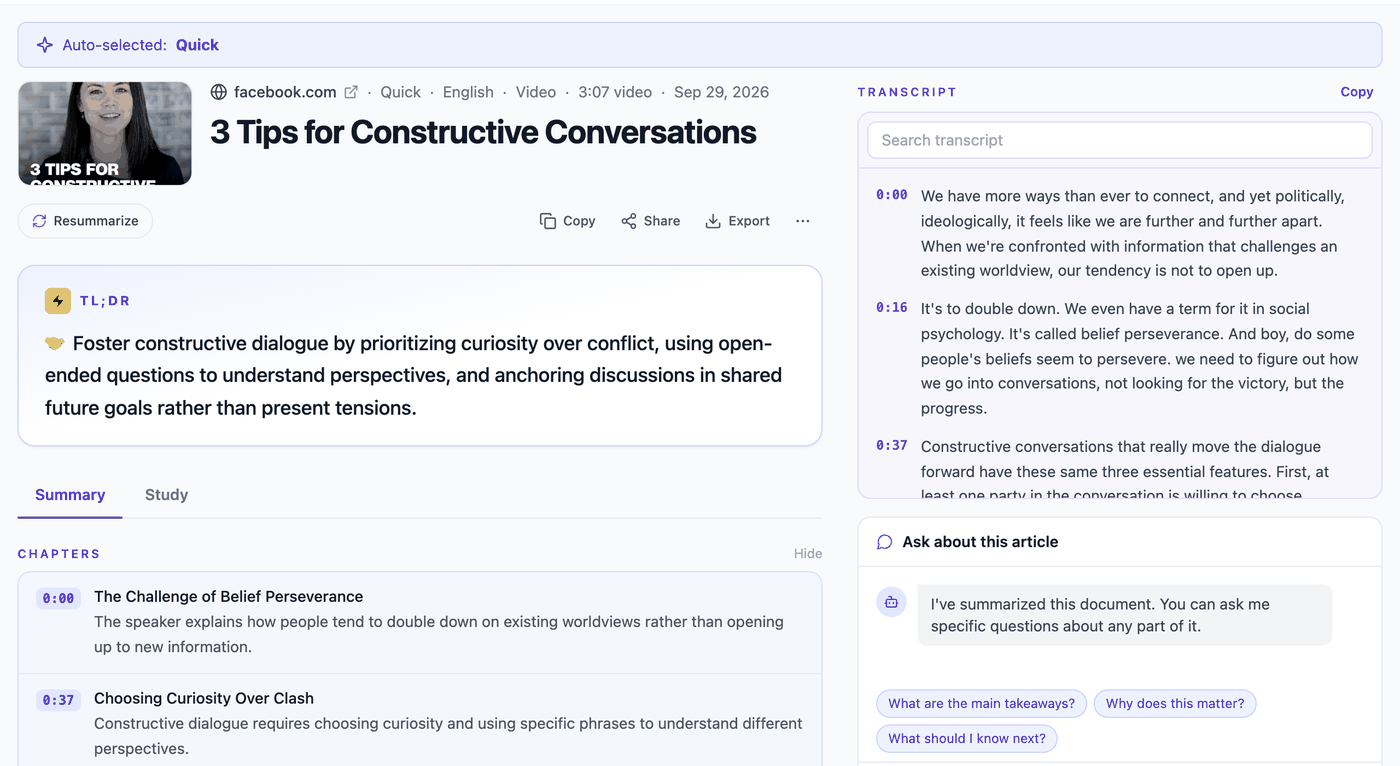
عرض خطة Pro. في الخطة المجانية النص هو نفسه، بدون توقيتات. واجهة التطبيق بالإنجليزية؛ أما الملخص فيأتي بلغة الفيديو أو باللغة التي تختارها.
من تطبيق فيسبوك على الهاتف
على الهاتف يمكنك تخطّي خطوة نسخ الرابط:
- أندرويد: افتح pagesum.app في Chrome وسجّل الدخول. بعد ملخصك الأول، اضغط Install عندما يعرضه PageSum، أو من قائمة Chrome اختر إضافة إلى الشاشة الرئيسية ← تثبيت. بعدها اضغط مشاركة على أي فيديو أو ريل في فيسبوك واختر PageSum، وسيبدأ التلخيص تلقائيًا.
- آيفون: في تطبيق فيسبوك اضغط مشاركة ← نسخ الرابط، ثم افتح pagesum.app في Safari واضغط Paste link. يبدأ التلخيص تلقائيًا. (لا يسمح iOS لتطبيقات الويب بالظهور في قائمة المشاركة، لذلك نسخ الرابط خطوة إضافية.)
ما روابط فيسبوك التي تعمل
كل ما هو عام ويُعرض كفيديو:
- الريلز:
facebook.com/reel/…والروابط المشاركة مثلfacebook.com/share/r/… - الفيديوهات:
facebook.com/watch/?v=…وfacebook.com/share/v/…والفيديوهات المنشورة على الصفحات - إعادات البث المباشر:
facebook.com/watch/live/?v=…بعد انتهاء البث - الروابط المختصرة:
fb.watch/…
ما لا يعمل: فيديوهات المجموعات الخاصة، والمنشورات للأصدقاء فقط، والبث المباشر الذي لا يزال جاريًا. كذلك يعرض فيسبوك بعض الريلز وإعادات البث للمستخدمين المسجّلين فقط، حتى لو كانت تبدو عامة لك وأنت مسجّل الدخول؛ PageSum لا يستطيع فتحها، وسيخبرك بذلك برسالة واضحة. التفاصيل في لماذا لا يمكن تلخيص بعض فيديوهات فيسبوك.
ولأن PageSum يلخّص ما يقوله الناس، يحتاج الفيديو إلى شخص يتكلم. المقاطع التي فيها موسيقى فقط لا تعطي ملخصًا.
فيديوهات بدون ترجمة
معظم ريلز فيسبوك بلا ترجمة مكتوبة، وهنا تتوقف أدوات تلخيص كثيرة. يبحث PageSum أولًا عن الترجمة، وإذا لم يجدها يحوّل الصوت إلى نص بالذكاء الاصطناعي قبل التلخيص، ويعمل ذلك مع الكلام بالعربية.
تحويل الصوت إلى نص أكثر كلفة من قراءة الترجمة، لذلك له حد زمني. الفيديوهات الأطول لا تُرفض: يلخّص PageSum بدايتها.
| مجاني | Pro | Max | |
|---|---|---|---|
| ملخصات الفيديو يوميًا | 1 (3 في اليوم الأول) | بلا حدود | بلا حدود |
| فيديوهات مع ترجمة | أي طول | أي طول | أي طول |
| فيديوهات بدون ترجمة | أول 5 دقائق | أول 10 دقائق | أول 90 دقيقة |
| أنماط التلخيص | سريع، النقاط الرئيسية | الستة | الستة |
| نسخ نص الفيديو وتنزيله | نعم | نعم | نعم |
| نص بالتوقيت متزامن مع الفيديو | لا | نعم | نعم |
معظم الريلز أقصر من 3 دقائق، لذلك تُلخَّص كاملة في الخطة المجانية. في إعادة بث طويلة، يغطي الملخص البداية، وهي عادة حيث يشرح المتحدث موضوع الجلسة.
ملخص بالعربية لفيديو بلغة أخرى
يعرض لك فيسبوك فيديوهات من كل مكان. يكتب PageSum الملخصات بـ 39 لغة، وافتراضيًا بلغة الفيديو. اختر Arabic من قائمة اللغة لتقرأ بالعربية ملخص فيديو بالإنجليزية أو الفرنسية أو التركية. وإذا كان الفيديو نفسه بالعربية، فاختيار Arabic يضمن أن يأتي الملخص بالعربية أيضًا.
نصائح لملخصات أفضل
- استخدم «النقاط الرئيسية» لفيديوهات الشرح. الوصفات والإصلاحات ومقاطع «كيف تفعل» تتحول إلى قائمة خطوات.
- اطرح سؤال متابعة. مثل «ما اسم الأداة التي ذكرها؟» أو «ما الخطوة الثالثة؟». الخطة المجانية تتضمن سؤالًا واحدًا يوميًا.
- احتفظ بنص الفيديو. انسخه أو نزّله بصيغة TXT من قائمة Export (وبصيغة SRT أو VTT عندما يتضمن توقيتات).
- ارجع إليه لاحقًا. كل ملخص يُحفظ في سجلّك (History)، فالفيديو الذي شاهدته الأسبوع الماضي على بُعد بحث واحد.
الأسئلة الشائعة
هل يستطيع الذكاء الاصطناعي تلخيص فيديو من فيسبوك؟ نعم. الصق الرابط في PageSum وسيلخّص ما يُقال في الفيديو. يستخدم الترجمة إن وُجدت، وإلا يحوّل الصوت إلى نص بالذكاء الاصطناعي.
هل توجد أداة مجانية لتلخيص فيديوهات فيسبوك؟ نعم. تتضمن خطة PageSum المجانية ملخص فيديو واحدًا يوميًا (3 في اليوم الأول) بنمطي «سريع» و«النقاط الرئيسية»، مع تحويل الصوت إلى نص للفيديوهات بدون ترجمة. لا تحتاج إلى بطاقة ائتمان.
هل يمكنني تلخيص ريل من فيسبوك؟
نعم. انسخ رابط الريل من «مشاركة» ← «نسخ الرابط» والصقه في PageSum. الروابط المختصرة مثل facebook.com/share/r/… تعمل، ما دام فيسبوك يعرض الريل لغير المسجّلين.
هل يمكنني تلخيص بث مباشر من فيسبوك؟ نعم، بعد انتهائه وإذا كانت الإعادة عامة. إذا لم تكن لها ترجمة، يلخّص PageSum أول 5 دقائق في الخطة المجانية، وأول 10 في Pro، وأول 90 في Max.
هل أحتاج إلى حساب فيسبوك؟ لا. يحتاج PageSum فقط إلى رابط عام. لتلخيص الفيديوهات تحتاج إلى حساب PageSum مجاني.
هل يصف ما يظهر على الشاشة؟ لا. يلخّص المحتوى المنطوق. النص المكتوب على الشاشة والموسيقى ليسا جزءًا من الملخص.
لخّص فيديو مجانًا · ذو صلة: تلخيص فيديو يوتيوب · تلخيص مقال · English version
More posts
'Comment for the Link' Reels: How to Get the Tool Name and Steps Without Commenting
AI-tool and side-hustle reels hide the details behind 'comment LINK and I'll DM you'. Paste the reel into PageSum to get the tool names, steps and prompts the creator actually says, in writing, then find the tool yourself. What it can and can't do.
Comment résumer une vidéo ou un Reel Facebook avec l'IA
Collez le lien d'une vidéo, d'un Reel ou d'un direct Facebook dans PageSum et obtenez en quelques secondes un résumé par IA et la transcription, même sans sous-titres. Liens compatibles, limites gratuites et conseils.
Cómo resumir una clase en video y convertirla en apuntes para estudiar
Resume una clase grabada o una clase de YouTube en un minuto, salta al capítulo que no entendiste, hazle preguntas y conviértela en tarjetas de estudio y cuestionarios. Un método de estudio con PageSum, gratis y Pro.
Como resumir uma videoaula e transformar em resumo para estudar
Resuma uma aula gravada ou uma videoaula do YouTube em um minuto, pule para o capítulo que você não entendeu, faça perguntas e transforme em flashcards e quizzes. Um método de estudo com o PageSum, grátis e Pro.
AI দিয়ে ফেসবুক ভিডিও বা রিলের সারাংশ কীভাবে করবেন
ফেসবুক ভিডিও, রিল বা লাইভের লিংক PageSum-এ পেস্ট করুন, আর কয়েক সেকেন্ডে পান AI সারাংশ ও পুরো ট্রান্সক্রিপ্ট, বাংলায়, ভিডিওতে সাবটাইটেল না থাকলেও। কোন লিংক কাজ করে, ফ্রি সীমা এবং টিপস।
How to Get an Instagram Reel Transcript (Even With No Captions)
Turn an Instagram Reel into text: paste the link, get the transcript and a summary, then copy it or download it. Works when the Reel has no captions. Free with a PageSum account.
4 Best Facebook Video Summarizers in 2026 (Compared)
PageSum, ScreenApp, BibiGPT and RecCloud compared for summarizing Facebook videos and Reels: which links they accept, free limits, videos without captions, output and price. Plus why NotebookLM can't do it.
Cómo resumir un video o Reel de Facebook con IA
Pega el enlace de un video, Reel o directo de Facebook en PageSum y recibe un resumen con IA y la transcripción en segundos, incluso si el video no tiene subtítulos. Qué enlaces funcionan, límites gratis y consejos.
Como resumir um vídeo do Facebook com IA (Reels, lives e vídeos do grupo)
Cole o link de um vídeo, Reel ou live do Facebook no PageSum e receba um resumo e a transcrição em segundos, mesmo sem legenda. Quais links funcionam, por que alguns vídeos dão erro e o que fazer com o vídeo que mandaram no WhatsApp.
Why Some Facebook Videos Can't Be Summarized (Private Groups, 18+ and 'Not Available')
Facebook hides many videos from anyone who isn't logged in, including some public Page videos. What the errors mean, a 10-second test to see if a video is reachable, and what to do instead, from our own tests and error logs.
How to Get the Transcript of a TikTok Video (Even Without Captions)
Three ways to get the text of a TikTok: TikTok's own auto-captions, copying the caption, or a transcript from PageSum that works even when the creator never turned captions on. With a real example and transcript export.
How to Summarize a Podcast Episode with AI (YouTube or MP3)
Get the key points of a podcast episode in a minute: paste its YouTube link or upload the MP3 to PageSum. What works, how long episodes are handled, free vs Pro limits, and how to turn an episode into notes.
How to Summarize an X (Twitter) Video with AI
Paste a post's link from X (Twitter) into PageSum and get an AI summary and transcript of the video in seconds, even though most X videos have no captions. Which links work, free vs Pro limits, and tips.
How to Turn a TikTok or Reel Recipe Video Into Written Steps
Paste a recipe video from TikTok, Instagram or Facebook into PageSum and get the steps as a list you can cook from. We tested two Tasty TikToks: what came through, what didn't (measurements), and why music-only recipe videos don't work.
How to Summarize a Facebook Live Replay (We Tested a 2.5-Hour Stream)
Facebook Live replays run for hours and rarely have captions. We summarized NASA's 2 h 27 min Crew-13 launch stream to show what a summarizer can and can't do with a Live replay, and how to get the part you need.
How to Summarize Lecture Videos and Turn Them Into Study Notes
Summarize a recorded lecture or YouTube class in a minute, jump to the right chapter, ask questions about it, and turn it into flashcards and quizzes. A study workflow with PageSum, free and Pro.
How to Get a Facebook Reel Transcript (Even With No Captions)
Turn a Facebook Reel, video or Live replay into text: paste the link, get the transcript and a summary, then copy it or download it as TXT, SRT or VTT. Works when the video has no captions.
How to Summarize a Facebook Video or Reel with AI
Paste a Facebook video, Reel or Live replay link into PageSum and get an AI summary and transcript in seconds, even when the video has no captions. Which links work, free vs Pro limits, and tips.
PageSum vs NoteGPT vs Eightify: Which YouTube Summarizer to Use
An honest comparison of PageSum, NoteGPT and Eightify for summarizing YouTube videos: platforms, videos without captions, pricing and who each tool is best for. Checked September 2026.
How to Summarize Long YouTube Videos and Podcasts
How to get a useful summary of a 1-hour lecture, podcast or livestream replay on YouTube: which mode to use, how chapters help, and what to know about very long transcripts.
How to Summarize a YouTube Video With No Captions
Most summarizers fail when a YouTube video has no subtitles. Here's how PageSum transcribes caption-less videos with AI, what the length limits are, and what to do when a video is too long.
5 Best Video Summarizer Tools in 2026 (Free & Paid)
Comparing the best AI video summarizer tools in 2026: PageSum, Summarize.tech, NoteGPT, Notta, and Kagi. Honest breakdown of features, limits, and which one is actually worth using.
How to Summarize TikTok and Instagram Videos with AI
Paste a TikTok, Instagram, X or Facebook video link into PageSum and get an AI summary. Explains when it works, what limits apply on the free and Pro plans, and why some videos can't be summarized.
How to Summarize a YouTube Video Without Watching It
Paste a YouTube link into PageSum to get an AI summary from the video's transcript. Covers free vs Pro limits, what to do when a video has no captions, and which summary mode to use.
PageSum vs ChatGPT for Summarizing: Which Should You Use?
An honest comparison of PageSum and ChatGPT for summarizing articles, PDFs and videos: where a dedicated summarizer helps, and where a general-purpose assistant is the better choice.
Artikel, URLs, PDFs und Videos zusammenfassen — mit KI in Sekunden
Mit PageSum fasst du Artikel-URLs, PDFs und Video-Dateien in Sekunden per KI zusammen. Format wählen, Inhalt eingeben oder hochladen — die KI erledigt den Rest.
Pagesum is Live on Product Hunt: AI Summarization for Everyone
We are officially launching Pagesum on Product Hunt! Discover how our 6 AI summary modes and Chrome extension help you read less and do more.
How to Summarize an Article for Me (Free AI Tool)
Looking for a tool that can summarize an article for you? Paste any URL into PageSum and get an instant AI summary in seconds — free to start.
PageSum Chrome Extension: Summarize Any Page in One Click
Install the PageSum Chrome extension and get instant AI summaries on any webpage without switching tabs. Works on articles, blogs, news, and more.
6 AI Summary Modes Explained: Which One Should You Use?
Compare Quick, Detailed, Key Points, ELI5, ELI10, and One-Liner summary modes to see which one fits your reading goal, not just the article length.
How to Summarize Any Article Online in Seconds
Learn how to summarize articles online with AI, choose the right summary style, and know when to trust the summary versus reading the full piece.
How to Summarize a PDF for Free (Without Copy-Pasting)
Summarize any PDF online for free. Drag, drop, and get an instant AI summary — no copy-pasting required. Works with research papers, reports, and ebooks.