
How to Turn a TikTok or Reel Recipe Video Into Written Steps
TL;DR: Paste a recipe video's link into PageSum and choose Key Points: you get the steps and tips as a list, plus the full transcript. It works when someone talks through the recipe. In our tests with two Tasty TikToks, the techniques came through perfectly, but exact amounts often weren't in the video at all; one video sends viewers to tasty.co for the full recipe. Videos with only music and on-screen text can't be summarized, because there's nothing spoken to transcribe.
Recipe videos are great for seeing how a dish should look and terrible for cooking from. You end up pausing with flour on your hands, scrubbing back for the amount of sugar. A written list of the steps fixes most of that.
What We Tested
On October 6, 2026 we summarized two recipe TikToks from Tasty's account with a free PageSum account.
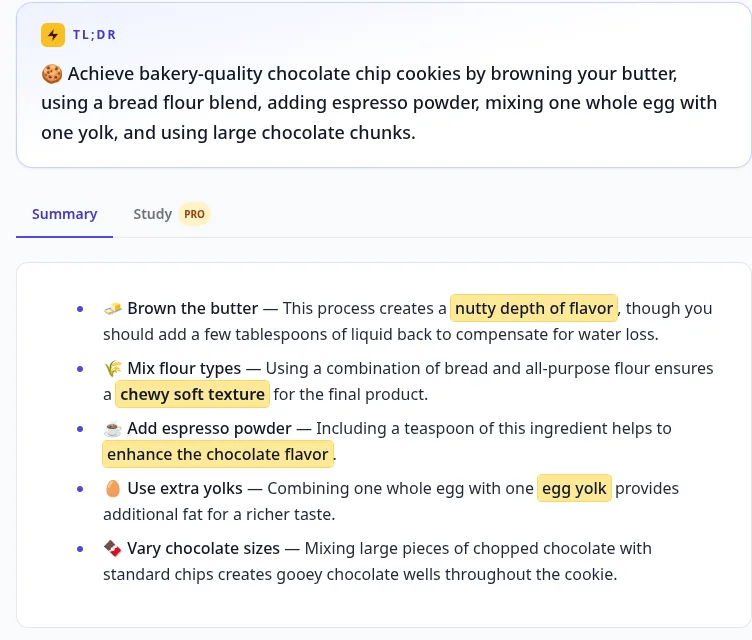
1. "5 tips to the perfect chocolate chip cookie" (1:00), in Key Points mode. The result was five clean bullets: brown the butter (and add a few tablespoons of liquid back), mix bread and all-purpose flour, add a teaspoon of espresso powder, use one whole egg plus one yolk, and mix chopped chocolate with chips.
2. "Can't find rice cakes near you?" (0:33), in Auto mode, which picked Quick. The summary grouped it into the substitute (rice paper softened in cool water), the filling (cheese sticks) and the sauce (dashi or any broth, red pepper paste, soy sauce, a sweetener, sesame oil and seeds).
Both took a few seconds, and both are under a minute: in our data, the median TikTok summarized on PageSum is 68 seconds long, and the median Instagram Reel 65 seconds. Videos that short are summarized in full on every plan, even without captions.
What Didn't Come Through: Measurements
This is the honest part. The summaries were accurate to the videos, but the videos themselves left out most amounts:
- The cookie video gives technique, not a recipe. Its last line is: "You can find the full recipe for the perfect chocolate chip cookie on tasty.co."
- The rice-paper video says "a spoonful of red pepper paste" and "any sweetener is fine", with no other quantities.
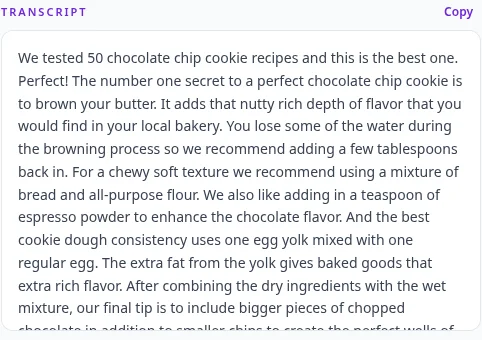
A summarizer can't add amounts the creator didn't say, and you shouldn't trust one that does. So:
- Read the transcript next to the summary for any amount that was spoken.
- Check the caption and the comments on TikTok or Instagram. Creators often put the full ingredient list there.
- Follow the creator's link if they point to a recipe site, as Tasty does.
Videos That Don't Work: Music Only
Many classic recipe videos, including the top-down style Tasty made famous on Facebook, have no narration at all: just music, hands and ingredient names shown as text on screen. PageSum summarizes what is said, so a music-only video gives it nothing to transcribe and you won't get a useful recipe out of it. (We didn't run one through PageSum for this guide; this follows from how it works.)
For those, the recipe is almost always in the post's caption or on the creator's website. A dedicated recipe-extraction app that reads on-screen text may also do better than a summarizer.
Tips for Recipe Videos
- Use Key Points. Each tip or step becomes one bullet you can tick off while cooking.
- Ask a follow-up question. "What can I use instead of espresso powder?" or "Can I make the sauce without dashi?" The free plan includes 1 question a day; Pro is unlimited.
- Translate as you go. Summaries come in 39 languages: read a Korean or Brazilian recipe video in English, or the other way around.
- Save it. Every summary stays in your history, so the recipe you saw on Tuesday is there on Saturday.
Frequently Asked Questions
Can AI turn a recipe video into a written recipe? Yes, for videos where someone talks through the steps. PageSum transcribes what is said and turns it into a list. It won't invent amounts that weren't said.
Does it work with TikTok, Instagram Reels and Facebook? Yes, with public videos on all three, plus YouTube Shorts.
Why is my recipe summary empty or vague? The video probably has only music and on-screen text. Check the post's caption for the recipe instead.
Is it free? Yes. The free plan includes 1 video summary a day (3 on your first day). Most recipe videos are under 3 minutes, so they're summarized in full even without captions.
Summarize a TikTok free · Related: How to Get a TikTok Transcript · How to Summarize TikTok and Instagram Videos
Tested on October 6, 2026: the PageSum team ran the steps in this guide on the live app with public videos. Screenshots are from those runs.
More posts
'Comment for the Link' Reels: How to Get the Tool Name and Steps Without Commenting
AI-tool and side-hustle reels hide the details behind 'comment LINK and I'll DM you'. Paste the reel into PageSum to get the tool names, steps and prompts the creator actually says, in writing, then find the tool yourself. What it can and can't do.
Comment résumer une vidéo ou un Reel Facebook avec l'IA
Collez le lien d'une vidéo, d'un Reel ou d'un direct Facebook dans PageSum et obtenez en quelques secondes un résumé par IA et la transcription, même sans sous-titres. Liens compatibles, limites gratuites et conseils.
Cómo resumir una clase en video y convertirla en apuntes para estudiar
Resume una clase grabada o una clase de YouTube en un minuto, salta al capítulo que no entendiste, hazle preguntas y conviértela en tarjetas de estudio y cuestionarios. Un método de estudio con PageSum, gratis y Pro.
Como resumir uma videoaula e transformar em resumo para estudar
Resuma uma aula gravada ou uma videoaula do YouTube em um minuto, pule para o capítulo que você não entendeu, faça perguntas e transforme em flashcards e quizzes. Um método de estudo com o PageSum, grátis e Pro.
AI দিয়ে ফেসবুক ভিডিও বা রিলের সারাংশ কীভাবে করবেন
ফেসবুক ভিডিও, রিল বা লাইভের লিংক PageSum-এ পেস্ট করুন, আর কয়েক সেকেন্ডে পান AI সারাংশ ও পুরো ট্রান্সক্রিপ্ট, বাংলায়, ভিডিওতে সাবটাইটেল না থাকলেও। কোন লিংক কাজ করে, ফ্রি সীমা এবং টিপস।
How to Get an Instagram Reel Transcript (Even With No Captions)
Turn an Instagram Reel into text: paste the link, get the transcript and a summary, then copy it or download it. Works when the Reel has no captions. Free with a PageSum account.
كيف تلخّص فيديو أو ريل من فيسبوك بالذكاء الاصطناعي
الصق رابط فيديو أو ريل أو بث مباشر من فيسبوك في PageSum واحصل على ملخص بالذكاء الاصطناعي ونص الفيديو في ثوانٍ، بالعربية، حتى لو لم يكن للفيديو ترجمة. ما الروابط التي تعمل، والحدود المجانية، ونصائح.
4 Best Facebook Video Summarizers in 2026 (Compared)
PageSum, ScreenApp, BibiGPT and RecCloud compared for summarizing Facebook videos and Reels: which links they accept, free limits, videos without captions, output and price. Plus why NotebookLM can't do it.
Cómo resumir un video o Reel de Facebook con IA
Pega el enlace de un video, Reel o directo de Facebook en PageSum y recibe un resumen con IA y la transcripción en segundos, incluso si el video no tiene subtítulos. Qué enlaces funcionan, límites gratis y consejos.
Como resumir um vídeo do Facebook com IA (Reels, lives e vídeos do grupo)
Cole o link de um vídeo, Reel ou live do Facebook no PageSum e receba um resumo e a transcrição em segundos, mesmo sem legenda. Quais links funcionam, por que alguns vídeos dão erro e o que fazer com o vídeo que mandaram no WhatsApp.
Why Some Facebook Videos Can't Be Summarized (Private Groups, 18+ and 'Not Available')
Facebook hides many videos from anyone who isn't logged in, including some public Page videos. What the errors mean, a 10-second test to see if a video is reachable, and what to do instead, from our own tests and error logs.
How to Get the Transcript of a TikTok Video (Even Without Captions)
Three ways to get the text of a TikTok: TikTok's own auto-captions, copying the caption, or a transcript from PageSum that works even when the creator never turned captions on. With a real example and transcript export.
How to Summarize a Podcast Episode with AI (YouTube or MP3)
Get the key points of a podcast episode in a minute: paste its YouTube link or upload the MP3 to PageSum. What works, how long episodes are handled, free vs Pro limits, and how to turn an episode into notes.
How to Summarize an X (Twitter) Video with AI
Paste a post's link from X (Twitter) into PageSum and get an AI summary and transcript of the video in seconds, even though most X videos have no captions. Which links work, free vs Pro limits, and tips.
How to Summarize a Facebook Live Replay (We Tested a 2.5-Hour Stream)
Facebook Live replays run for hours and rarely have captions. We summarized NASA's 2 h 27 min Crew-13 launch stream to show what a summarizer can and can't do with a Live replay, and how to get the part you need.
How to Summarize Lecture Videos and Turn Them Into Study Notes
Summarize a recorded lecture or YouTube class in a minute, jump to the right chapter, ask questions about it, and turn it into flashcards and quizzes. A study workflow with PageSum, free and Pro.
How to Get a Facebook Reel Transcript (Even With No Captions)
Turn a Facebook Reel, video or Live replay into text: paste the link, get the transcript and a summary, then copy it or download it as TXT, SRT or VTT. Works when the video has no captions.
How to Summarize a Facebook Video or Reel with AI
Paste a Facebook video, Reel or Live replay link into PageSum and get an AI summary and transcript in seconds, even when the video has no captions. Which links work, free vs Pro limits, and tips.
PageSum vs NoteGPT vs Eightify: Which YouTube Summarizer to Use
An honest comparison of PageSum, NoteGPT and Eightify for summarizing YouTube videos: platforms, videos without captions, pricing and who each tool is best for. Checked September 2026.
How to Summarize Long YouTube Videos and Podcasts
How to get a useful summary of a 1-hour lecture, podcast or livestream replay on YouTube: which mode to use, how chapters help, and what to know about very long transcripts.
How to Summarize a YouTube Video With No Captions
Most summarizers fail when a YouTube video has no subtitles. Here's how PageSum transcribes caption-less videos with AI, what the length limits are, and what to do when a video is too long.
5 Best Video Summarizer Tools in 2026 (Free & Paid)
Comparing the best AI video summarizer tools in 2026: PageSum, Summarize.tech, NoteGPT, Notta, and Kagi. Honest breakdown of features, limits, and which one is actually worth using.
How to Summarize TikTok and Instagram Videos with AI
Paste a TikTok, Instagram, X or Facebook video link into PageSum and get an AI summary. Explains when it works, what limits apply on the free and Pro plans, and why some videos can't be summarized.
How to Summarize a YouTube Video Without Watching It
Paste a YouTube link into PageSum to get an AI summary from the video's transcript. Covers free vs Pro limits, what to do when a video has no captions, and which summary mode to use.
PageSum vs ChatGPT for Summarizing: Which Should You Use?
An honest comparison of PageSum and ChatGPT for summarizing articles, PDFs and videos: where a dedicated summarizer helps, and where a general-purpose assistant is the better choice.
Artikel, URLs, PDFs und Videos zusammenfassen — mit KI in Sekunden
Mit PageSum fasst du Artikel-URLs, PDFs und Video-Dateien in Sekunden per KI zusammen. Format wählen, Inhalt eingeben oder hochladen — die KI erledigt den Rest.
Pagesum is Live on Product Hunt: AI Summarization for Everyone
We are officially launching Pagesum on Product Hunt! Discover how our 6 AI summary modes and Chrome extension help you read less and do more.
How to Summarize an Article for Me (Free AI Tool)
Looking for a tool that can summarize an article for you? Paste any URL into PageSum and get an instant AI summary in seconds — free to start.
PageSum Chrome Extension: Summarize Any Page in One Click
Install the PageSum Chrome extension and get instant AI summaries on any webpage without switching tabs. Works on articles, blogs, news, and more.
6 AI Summary Modes Explained: Which One Should You Use?
Compare Quick, Detailed, Key Points, ELI5, ELI10, and One-Liner summary modes to see which one fits your reading goal, not just the article length.
How to Summarize Any Article Online in Seconds
Learn how to summarize articles online with AI, choose the right summary style, and know when to trust the summary versus reading the full piece.
How to Summarize a PDF for Free (Without Copy-Pasting)
Summarize any PDF online for free. Drag, drop, and get an instant AI summary — no copy-pasting required. Works with research papers, reports, and ebooks.